Next Dayz
$5.99
Undetected · Feb 22, 2026
- Supported OS: Windows 10, Windows 11 (21H2, 22H2, 23H2, 24H2, 25H2)
- Supported CPU: Intel & AMD
- Video card: Nvidia & AMD
- Client: Steam
Adjustable targeting with hitbox control.
- Mouse / Silent Aimbot – choose between mouse-controlled aim or fully silent aiming
- Silent Aim Key – dedicated keybind to activate silent aim
- Targeting Type – select targets by closest FOV or closest distance
- Aimbot FOV – fully adjustable field of view for target selection
- Target Swap Delay – delay between switching targets for natural behavior
- Max Aim Distance – limit aimbot activation range
- Aim Bone – select target bones (head / chest / pelvis, etc.)
- Silent Aim Hit Chance – control hit probability for legit-style gameplay
- Mouse Smooth Factor – smooth aiming movement to avoid sharp snaps
- Target Visible Only – aim only at visible targets (visibility check)
- Target Lock – lock onto a single target until released
- Ignore Entities – individually ignore players, zombies, or animals
- Magic Bullet – advanced bullet redirection with bypass, distance, and key options
- Smart Curve Bullet – curved bullet trajectories for enhanced accuracy
- Smart Bullet Key – dedicated keybind for smart bullet activation
- Combat Mode Key – toggle combat-optimized aimbot behavior
- Draw FOV Circle – display customizable FOV circle with color selection
- Draw Target Snapline – draw snaplines from crosshair to target
- Target Snapline Color – fully customizable snapline colors
- Aim Target Color – color indicator for the current aimbot target
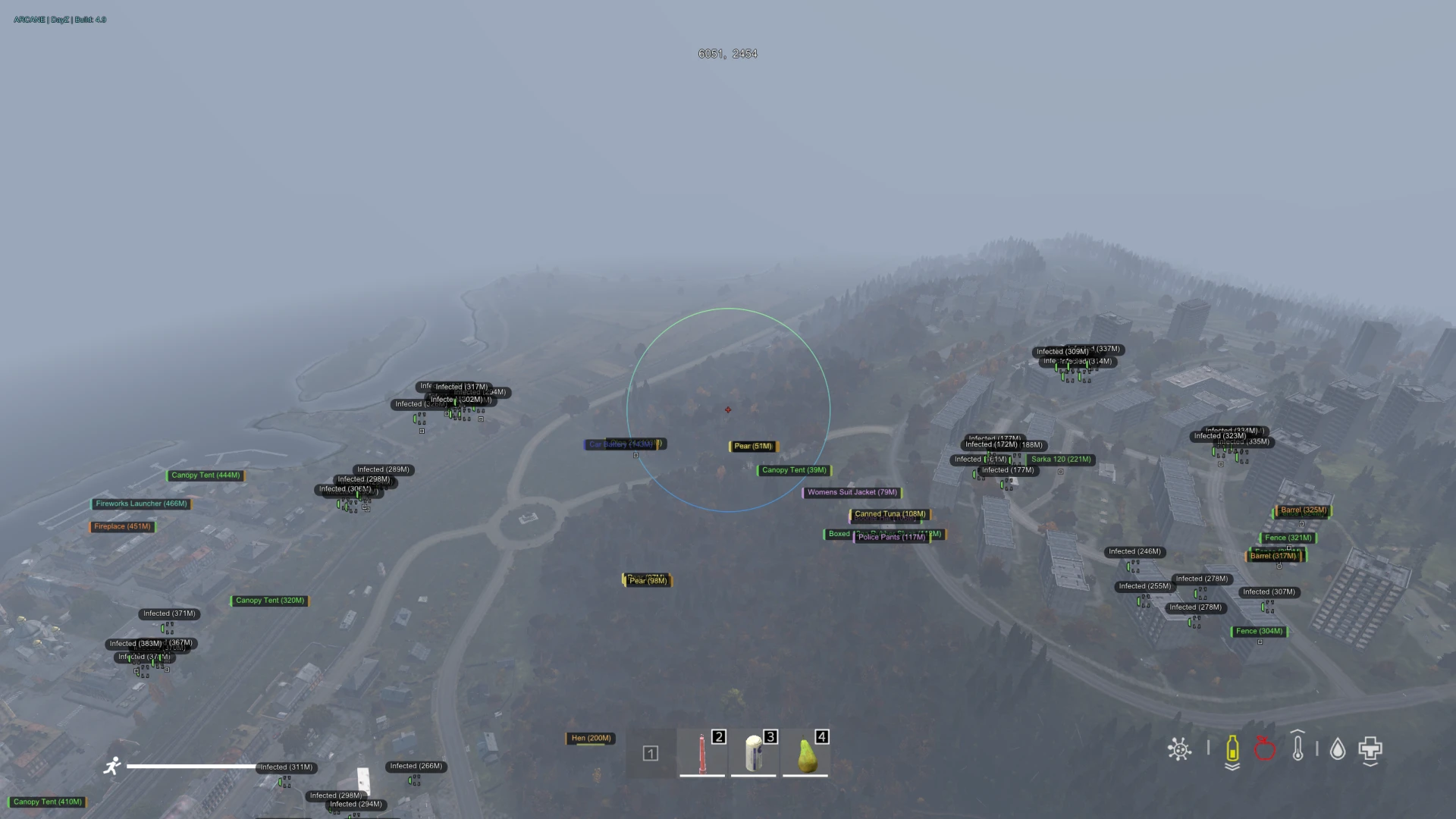
Customizable player awareness visuals.
- Name / Distance – displays player names and distance in real time
- Visible Check – different ESP state for visible and non-visible targets
- Held Item / Inventory – shows currently held weapon and inventory items
- Health Bar / Show Quality – health bars with item quality indicators
- Skeleton / Bounding Box – skeleton ESP and bounding box visualization
- Show Corpse – displays dead bodies and corpses
- Vertical Health Bar – alternative vertical-style health bars
- Name Color – custom color for player names
- Visible / Invisible Color – separate colors based on target visibility
- Box Type – cornered or full square box styles
- Player List – list of all players with advanced controls
- Player List (Admin Status) – instantly identify server admins
- Ignore for ESP – exclude selected players from ESP
- Friendly Flag – mark players as friendly (ignored by aimbot)
- Custom Player Color – assign individual colors per player
- Steam Tools – open Steam profile or copy Steam ID
- Radar – built-in radar with real-time entity tracking
- Show Players / Zombies – toggle visibility on radar
- Draw Distance – display distance indicators for entities
- Look Direction – shows the direction entities are facing
- Show Ruined Items – displays ruined or broken items on ESP
- Restrict ESP (FOV) – shows item ESP only inside your field of view to reduce clutter
- Structure ESP – highlights structures and important world objects
- Container ESP – displays containers and their contents (crates, barrels, storage)
- Sites ESP – shows wreck sites and special loot areas
- Trap / Contamination / Activation Zones – visualizes traps, gas zones, and activation areas
- Consumable ESP – highlights food, drinks, and medical consumables
- Show Names – displays item names on ESP
- Show Distance – shows distance to each item
- Show Quality – displays item condition and quality level
- Item ESP Grouping – groups similar items to reduce screen clutter
- Item Category ESP – filter items by category (weapons, meds, food, gear)
- Item List – full list of items with individual customization
- Item Enable / Ignore – enable or ignore specific items individually
- Item Max Distance – set maximum draw distance per item
- Item Custom Color – assign custom colors to individual items
- Rename Object ESP – rename any object displayed on ESP
World object and item visibility.
- Show Landmarks – displays important landmarks directly on ESP
- Landmark Categories – villages, cities, castles, and airfields
- Military Bases – highlights military zones and high-tier loot areas
- Map Selection – select the active map for accurate world ESP
- Show Location Names – displays location names on screen
- Show Location Distance – shows distance to landmarks and locations
- Location Color – customize colors per location type
- Saved Locations – save custom locations for later reference
- Saved Location ESP – display saved coordinates on ESP
- Custom Location Data – store name, distance, and color for each saved location
- Scripting Engine – advanced scripting engine for automation and extended functionality
- Speedhack – adjustable movement speed with value control and keybind
- Force Third Person – force third-person view even on restricted servers
- Force Crosshair – enable crosshair on servers where it’s normally disabled
- Remove Grass – removes grass for improved visibility
- Draw Compass – on-screen compass for better navigation
- Combat Mode Key – quick toggle for combat-optimized settings
- Loot Teleport – teleport loot directly to your position
- Corpse Teleport – teleport dead bodies to your location for fast looting
- Loot Teleport Key – dedicated keybind to activate loot teleport
- Highlight Loot Color – custom highlight color for teleported or important loot
- Item Duplication – duplicate items by spawning identical copies
- Loot Living Players – access and duplicate items directly from alive players
- HWID Spoofer Included
What is Next Dayz for dayz?
Next for DayZ is an external focused on the information layer — players, vehicles, items and the stashes other groups have buried. It reads the game from a separate process rather than injecting into it, which keeps it clear of the checks BattlEye applies to loaded modules.
DayZ rewards knowing things more than it rewards shooting well. Six hours of careful play ends in two seconds to someone you never saw, and the fights you avoid are worth more than the ones you win.
Survival information
- Player ESP with distance, readable at the ranges DayZ actually fights at
- Stash and tent indicators — the hidden economy of every server
- Vehicle tracking, which is otherwise close to luck
- Zombie and animal awareness, since noise pulls players as well as infected
Loot filtering
- Item ESP with category filtering
- Weapon and ammunition highlighting
- Medical supply filtering — on DayZ an untreated injury ends the character
Configuration
- Adjustable draw distances so a town is readable rather than a wall of boxes
- Streamproof rendering
- Adjustable menu key
Detection risk and anti-cheat
Official servers apply global BattlEye bans; community servers apply their own, and the large networks share lists. Being clean on one says nothing about the other.
Admins act on movement patterns. Walking directly to a buried stash is visible in logs and needs no client-side detection to notice.
DayZ's pace works in your favour: there is time to take a plausible route and behave like someone who is genuinely searching. The players who get removed are the ones who stopped bothering.
Live detection status for every product is on the status page, and how detection actually works is covered in our anti-cheat explainer.
System requirements
- Windows 10 or 11, 64-bit
- Secure Boot disabled
- Steam copy of DayZ
- Administrator rights for the loader
When to choose Next Dayz
- Stash and vehicle information is what you actually want
- You play long sessions and losing geared characters is what costs you
- You would rather have information than aim assistance
When something else is the better buy
- If you play several games, Arcane covers DayZ alongside Rust, Apex and CS2 on one subscription.
- If you have already been hardware banned, buy a spoofer first — no cheat helps on flagged hardware.
Frequently asked questions
What is the most useful feature on DayZ?
Stash and tent information. Finding what another group buried is the difference between a week of grinding and a full kit in an afternoon, and unlike aim it produces nothing anyone can watch.
Will admins notice?
They notice routing. Arriving repeatedly at loot buildings or stashes nobody else has found is visible in movement data, so act on what you know at a plausible pace.
Does a community ban follow me?
A community ban is that server's own, though large networks share lists. A global BattlEye ban from official servers is separate.
Is it detected?
Check the live status shown on this page immediately before you play — it syncs from the supplier feed rather than being edited by hand.